My Favorite

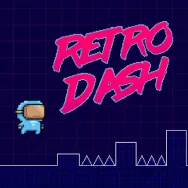
Retro Dash
Retro Dash
















Retro Dash is a geometric arcade obstacle course that distinguishes itself through an innovative, on-the-fly mass-shifting mechanic. Unlike traditional static runners, this game forces you to constantly manipulate your character’s scale, transforming your physical footprint and attributes mid-run to survive complex environments.
Standout Features
- Dynamic Size-Shifting Engine: Instantly swap between Small, Medium, and Large forms to match changing structural pathways.
- Four Unique Campaign Tiers: Progress sequentially through the Tutorial, The Factory, The Streets, and the high-altitude challenges of The Heights.
- Customizable Physics Calibration: Tailor the challenge to your skill level by manually adjusting horizontal movement speeds.
- Flexible Checkpoint Toggle: Add or remove mid-level checkpoints to switch between an accessible practice run and an unforgiving, one-shot arcade gauntlet.
Gameplay Mechanics
The main objective of Retro Dash is to navigate a continuously sprinting character through four distinct, increasingly hostile levels to reach the final checkpoint.
How to Play
In Retro Dash, movement is fully automated, shifting your entire focus to jumping and shifting sizes using dedicated keys
- Left Arrow: Transforms your character into Small form (perfect for slipping under low ceilings)
- Up Arrow: Instantly sets your character to Medium form (the baseline for clearing standard hazards)
- Right Arrow: Enters Large form (unlocks maximum jump distance and the power to shatter walls)
Tips to Survive Longer
- Read the Simple Geometry: The game utilizes clean, sprite-based basic shapes. Use this high-contrast visual style to instantly identify upcoming spikes, walls, or pits before you reach them
- Avoid Large-Form Desynchronization: Do not stay in Large form during tight sequences; its oversized hitbox easily desynchronizes your jumping rhythm against low-clearance blocks
- Buffer Mid-Air Transforms: On high-altitude maps, execute your size shift while airborne to properly prep your collision profile for the upcoming landing pad
FAQs
How do I break through brick walls in Retro Dash?
You must press the Right Arrow key to swap into the Large size profile, which gives you the physical mass required to shatter solid obstacles.
Can the Small size clear spike traps?
No. While the Small form easily fits through narrow gaps, it possesses zero vertical jump height and cannot clear any spikes.
How do I adjust the difficulty settings?
Before starting a run, you can manually toggle level checkpoints and increase or decrease the baseline horizontal running speed in the settings menu.
Similar Challenging Platform Titles
 Arcade
  Platform



















Comment (0)
Newest
NewestOldestPopular

Be the first to comment